


Building a multilingual website on WordPress requires the right tools. WPML has been the go-to solution for over a decade, but is it still the best choice? WPML makes it easy to create and manage multilingual WordPress sites by simplifying translation management, SEO, and site navigation. This independent review covers everything from automatic translation to WooCommerce multicurrency, based on real-world testing.
This article provides a step by step guide to using WPML.
Quick Answer: Is WPML Worth It in 2026?
WPML (WordPress Multilingual Plugin) is a premium translation plugin actively developed and maintained in 2026. It transforms any WordPress website into a fully functional multilingual site with support for multiple currencies.
Our independent verdict:
- Ideal for WooCommerce shops needing multicurrency support across EU, UK, and US markets
- Excellent for corporate sites requiring professional translation workflows with multiple translators
- Strong choice for agencies managing many client sites with the Multilingual Agency plan
- The Multilingual CMS plan is suitable for most websites, offering a balance of features and value.
- May be overkill for simple two-language blogs where Polylang or TranslatePress could be simpler
Current facts (2026):
- Supports 65+ languages including RTL languages like Arabic and Hebrew
- Powers over 1 million active WordPress sites worldwide
- Tested and compatible with WordPress 6.5.x and PHP 8.1/8.2
- Fully compatible with WooCommerce 8.x and major page builders
Pricing overview:
- Plans start from €39/year (Multilingual Blog) up to €199/year (Multilingual Agency)
- The Multilingual CMS plan costs €99 per year and supports three live sites and nine test sites.
- The Multilingual CMS plan includes 90,000 auto-translation credits and advanced translation tools.
- Automatic translation credits now built into higher tiers (90,000+ credits in CMS plan)
- 30-day money-back guarantee on all plans
Important note: After testing many plugins, we ultimately use WPML as the tool providing multilingual support on Prehost.com.
What Is WPML? (Clear Definition & Use Cases)
WPML is a commercial WordPress plugin suite, known as the WPML plugin, designed for creating multilingual websites from a single WordPress install. Unlike cloud-based translation services, WPML stores all translations directly in your WordPress database, giving you full control over your website’s content in different languages.
Main use cases with concrete examples:
- Small blogs: A travel blogger running an English-Spanish site can translate posts, menus, and widgets without technical complexity, and easily expand to multiple languages as their audience grows.
- Mid-size corporate sites: A German software company maintaining English, French, and German versions of their corporate pages with separate SEO metadata per language, translating the website’s content for each market.
- Large WooCommerce stores: An EU fashion retailer selling across Europe in EUR, CHF, GBP, and PLN with localized product pages, checkout flows, and shipping information, all managed in multiple languages.
WPML’s modular system includes:
- WPML Multilingual CMS (core plugin for posts, pages, taxonomies)
- String Translation (for theme and plugin texts)
- WooCommerce Multilingual & Multicurrency (for e-commerce)
- Translation Management (for professional translator workflows)
- Media Translation (for translating images and media file names)
You can also add your own language variants, such as Canadian French or Mexican Spanish, to address region-specific needs and enhance localization.
What WPML translates:
- Posts, pages, and custom post types
- Categories, tags, and custom taxonomies
- Navigation menus and widgets
- Theme strings and plugin-generated texts
- WooCommerce products, variations, and checkout flows
WPML allows you to translate content on your website into 65 pre-configured languages, and you can translate your website’s content into other languages to improve SEO and reach a wider audience.
How WPML Works: Translation Methods Explained
After activation, WPML will prompt you to configure the plugin and select the languages you want to use. Once setup is complete, you can start translating your website content.
WPML offers three main approaches to translate content: automatic machine translation, manual in-house translation, and external professional translators. You can translate content automatically using WPML’s automatic translation features, which include machine translation options and credit systems. All methods are managed directly inside your WordPress dashboard, eliminating the need for external platforms.
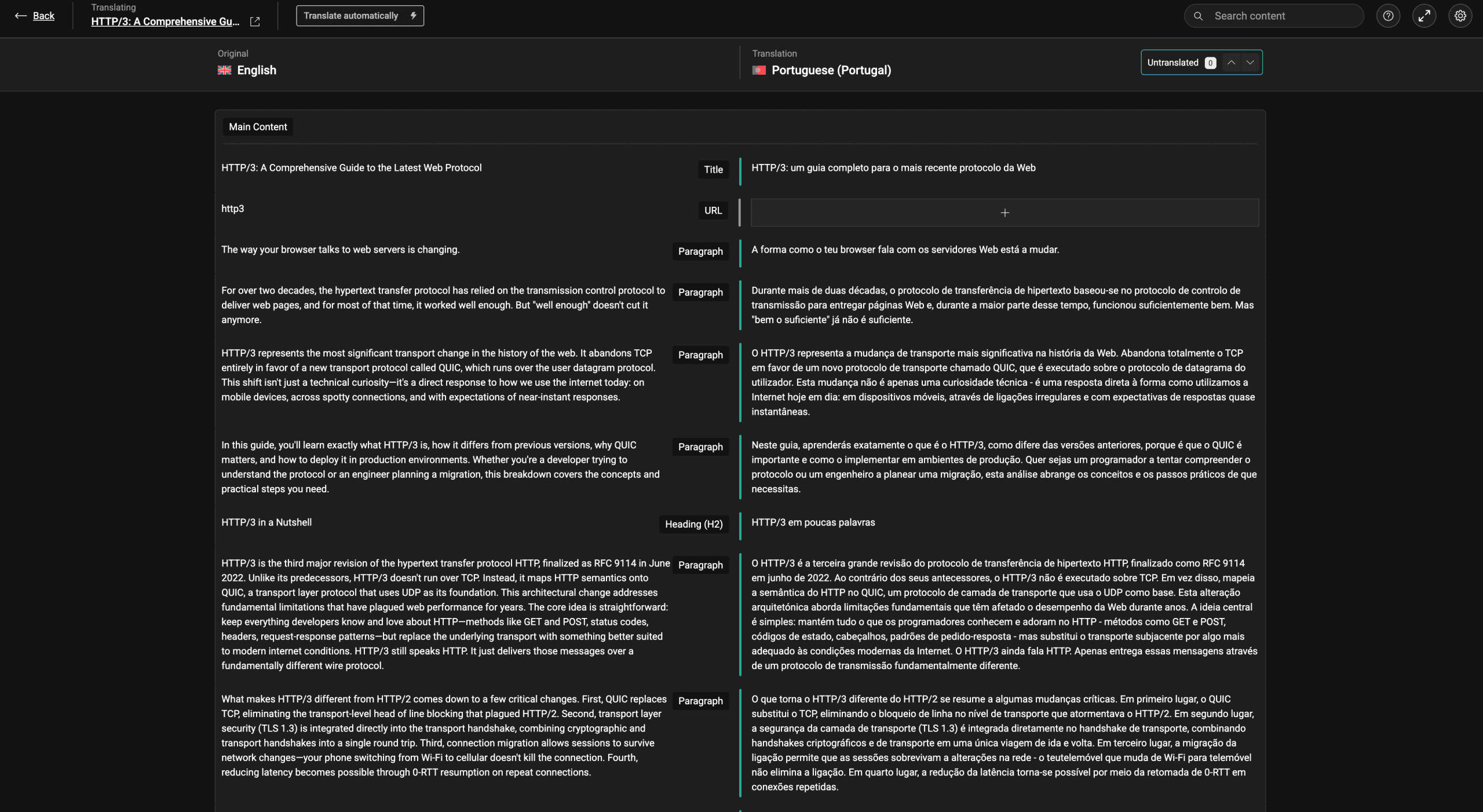
The Advanced Translation Editor (ATE):
- Two-column interface with source text on the left and target language on the right
- Segment-by-segment translation for precise control
- Built-in glossary support for consistent terminology
- Spellchecking and grammar suggestions
- Side-by-side comparison of original and translation
Supported translation engines:
- DeepL (known for high quality translations in European languages)
- Google Translate (widest language coverage)
- Microsoft Translator (good for technical content)
- WPML’s own AI translation service
Content type flexibility:
- Configure automatic translation for high-volume content like blog posts and product descriptions
- Keep manual translation for legal pages, pricing pages, and brand-sensitive copy
- Mix methods within the same site based on content importance
- Translate categories and other taxonomy terms to ensure consistency across languages
Database storage:
- All translations stored in WordPress database (no SaaS lock-in)
- Rollback to previous revisions works like standard WordPress posts
- Export and backup translations with standard WordPress tools
Automatic Translation in WPML
Automatic translation is enabled via WPML → Settings → Automatic Translation and requires translation credits. Credits are calculated per word, and the number of credits required depends on the translation engine you choose. Credit allocations differ by plan tier in 2026: approximately 90,000 credits in CMS plan and 180,000 in Agency plan.
How the workflow operates:
- Select pages, posts, or products in Translation Management dashboard
- Choose target languages (e.g., English → French, Spanish, German)
- Send content to the automatic translation queue
- ATE processes translations using your selected translation engines
- Content flags as “Needs review” for human verification. The automatic translation feature allows you to scan and edit any text during verification.
Supported elements for automatic translation:
- Posts, pages, and custom post types
- Custom fields (via WPML & ACF compatibility)
- WooCommerce product data including variations
- Widgets and sidebar content
- Menu items and navigation
- Many plugin-generated texts
Best practices for AI translation:
- Use automatic translation for large catalogs (1,000+ products) and frequently changing content
- Always assign reviewers for quality control
- Reserve manual translation for legal notices, pricing pages, and sensitive brand copy
- Set up language-specific reviewers who are native speakers

Manual Translation & Professional Translators
Manual translation can be performed by site admins, editors, or dedicated “Translator” user roles created through WPML → Translation Management → Translators. Each translator can access their account to view assigned translation jobs and manage their work.
Creating translation jobs:
- Select content from the Translation Dashboard
- Choose target languages for each piece of content
- Send as jobs to assigned translators
- Translators see their queue in WPML → Translations screen
- Complete translations move to review status
Professional translation service integrations:
- TransPerfect integration for enterprise-level translation
- Lionbridge connectivity for technical documentation
- Other translation agency connectors via Translation Jobs system
- Direct API connections to translation memory systems
Example workflow:
A Polish e-commerce site adding English and Czech languages. Product managers prepare product descriptions in Polish, send translation jobs to agency translators from inside WPML, translators work in the Advanced Translation Editor, and then product managers approve the results before publishing.
Alternative translation methods:
- Use the native WordPress editor (Gutenberg or classic) instead of ATE for complex layouts
- Directly edit translations in page builders like Elementor or Bricks
- Import translations from CSV files for bulk operations
Translation Workflow Control & Quality Assurance
WPML allows defining granular rules per language and content type, ensuring the right translation method is applied to each piece of content.
Rule configuration examples:
- Automatic translation for news posts and blog articles
- Manual-only translation for cornerstone pages and legal content
- Professional translator assignment for product descriptions
- In-house review for all machine-translated content
Status tracking in Translation Dashboard:
- “Waiting for translator” – job assigned but not started
- “In progress” – translator actively working
- “Needs review” – translation complete, awaiting approval
- “Complete” – published and live
Quality assurance features:
- Side-by-side comparison of original and translation
- Change history with ability to revert to previous versions
- Terminology glossary in ATE for brand names and technical terms
- Style notes for translators (tone, formality level)
- Section locking for approved content
Practical QA tips:
- Create a glossary entry for every brand name, product name, and technical term
- Add style notes specifying formal vs. informal tone per language
- Lock completed sections to prevent accidental changes
- Schedule regular reviews of machine-translated content
WPML Multicurrency & WooCommerce Integration
WPML is often recommended for larger multilingual websites and for users managing many sites due to its comprehensive features. This makes it a strong choice for agencies or businesses running multiple WooCommerce stores that require robust translation and multicurrency support.
WPML includes a dedicated “WooCommerce Multilingual & Multicurrency” module, widely used in EU and global shops since WooCommerce 3.x. It remains fully compatible with current WooCommerce releases including version 8.x.
Core WooCommerce translation capabilities:
- Products, variations, and product galleries
- Categories, tags, and attributes
- Cart, checkout, and thank-you page texts
- Order emails and notifications
- Shipping methods and tax labels
Payment gateway compatibility:
- Stripe (customers pay in their selected currency)
- PayPal (automatic currency conversion)
- Many EU local gateways (Klarna, iDEAL, Przelewy24)
- Store accounting remains in base currency while customers see their preferred currency
SEO-friendly URL structure:
- Separate slugs for product categories per language (/en/shoes/, /fr/chaussures/, /de/schuhe/)
- Translated attribute slugs (/en/color-red/, /de/farbe-rot/)
- Language-specific product URLs for better search engines indexing
Managing Products, Categories & Store URLs
Products can be duplicated from the original language and translated field-by-field, maintaining inventory synchronization while localizing content.
Product translation process:
- Duplicate product from source language to target language
- Translate title, description, and short description
- Localize custom fields (technical specs, sizing guides)
- Translate variation names and attribute values
- Sync inventory and pricing across all language versions
- Use WPML’s taxonomy translation tools to translate categories, ensuring category names and related taxonomy elements are consistent across all languages
Store URL configuration (WPML → WooCommerce → Store URLs):
- Translate base slugs: “product” → “produkt” (German), “producto” (Spanish)
- Translate category base: “product-category” → “produkt-kategorie”
- Translate tag base: “product-tag” → “produkt-tag”
- Translate attribute bases for filter-friendly URLs
Why localized URLs matter:
- Google indexes /es/categoria-producto/ correctly for Spanish markets
- Users see familiar terms in their browser address bar
- Improved click-through rates from search results
- Better multilingual seo signals for regional targeting
Theme and plugin strings in WooCommerce:
- Cart texts (“Your cart is empty”) come from localization files
- Scan under WPML → Theme and plugins localization
- Edit translations under WPML → String Translation
- “Add to cart” button, checkout labels, and email templates all translatable
Multicurrency: Exchange Rates & Manual Prices
The multicurrency feature allows defining a primary currency and multiple secondary currencies with flexible pricing controls.
Currency setup:
- Define primary currency (e.g., EUR for EU-based business)
- Add secondary currencies (USD, GBP, PLN, CHF)
- Choose automatic or manual exchange rates per currency
Exchange rate management:
- Automatic updates from currency providers (daily, hourly, or custom intervals)
- Manual override for specific currencies
- Rate markup/markdown for profit margin adjustment
- Historical rate logging for accounting
Manual price per currency option:
- Specify exact prices in secondary currencies for particular products
- Use case: psychological pricing (€19.90, $21.90, £18.90 instead of calculated rates)
- Override automatic conversion for promotional pricing
- Set different prices for different markets based on purchasing power
Display formatting per currency:
- Currency symbol position (before or after amount)
- Decimal separator (comma vs. period)
- Thousand separator formatting
- Number of decimal places
Currency & Language Targeting by Country
By default, all currencies are available for all languages, but WPML allows restricting specific currencies to specific markets for a cleaner user experience.
Market-specific currency rules:
- Show HUF only for Hungarian language visitors
- Display CHF only for Switzerland-targeted pages
- Restrict GBP to UK English visitors
- Show PLN only for Polish language version
Geolocation features:
- Auto-suggest currency based on customer IP address
- Detect shipping address country for currency selection
- Fall back to language-based currency if geolocation fails
- Allow customer override of suggested currency
Combined language and currency switchers:
- Header dropdown showing “English – USD,” “Deutsch – EUR”
- Footer widget with flag icons and currency symbols
- Mobile-friendly switcher designs
- Customizable via CSS for brand consistency
Conversion optimization:
- Avoid showing CHF to users in countries where Swiss franc is uncommon
- Reduce cart abandonment by displaying familiar currencies
- Streamline checkout with pre-selected currency based on location
Multilingual SEO with WPML
WPML is structured to support proper international SEO with separate URLs per language, automatic hreflang tags, and per-language metadata. This helps Google, Bing, and regional search engines like Yandex and Seznam index content correctly. Optimizing your site for other languages is essential to improve search engine discoverability and reach a wider audience.
URL structure options (WPML → Languages):
- Language directories: example.com/en/, example.com/fr/, example.com/de/
- Subdomains: en.example.com, fr.example.com, de.example.com
- Separate domains: example.com, example.fr, example.de
- URL parameters: example.com?lang=en (not recommended for SEO)
SEO plugin integration:
- Yoast SEO: translate titles, meta descriptions, social tags per language
- Rank Math: separate focus keywords and schema per translation
- All in One SEO: per-language sitemap and metadata control
- WPML integrates with popular SEO plugins like Yoast SEO and Rank Math to add hreflang tags that notify search engines about different language versions.
Duplicate content prevention:
- Translations linked as language equivalents, not separate pages
- Canonical URLs properly set per language version
- Hreflang tags signal language relationships to search engines
Localized Slugs, Sitemaps & Hreflang
Translating slugs improves click-through rates and signals relevance to users searching in their native language.
Slug translation examples:
- /services/ → /leistungen/ (German), /servicios/ (Spanish)
- /about-us/ → /ueber-uns/ (German), /sobre-nosotros/ (Spanish)
- /contact/ → /kontakt/ (German), /contacto/ (Spanish)
Hreflang implementation:
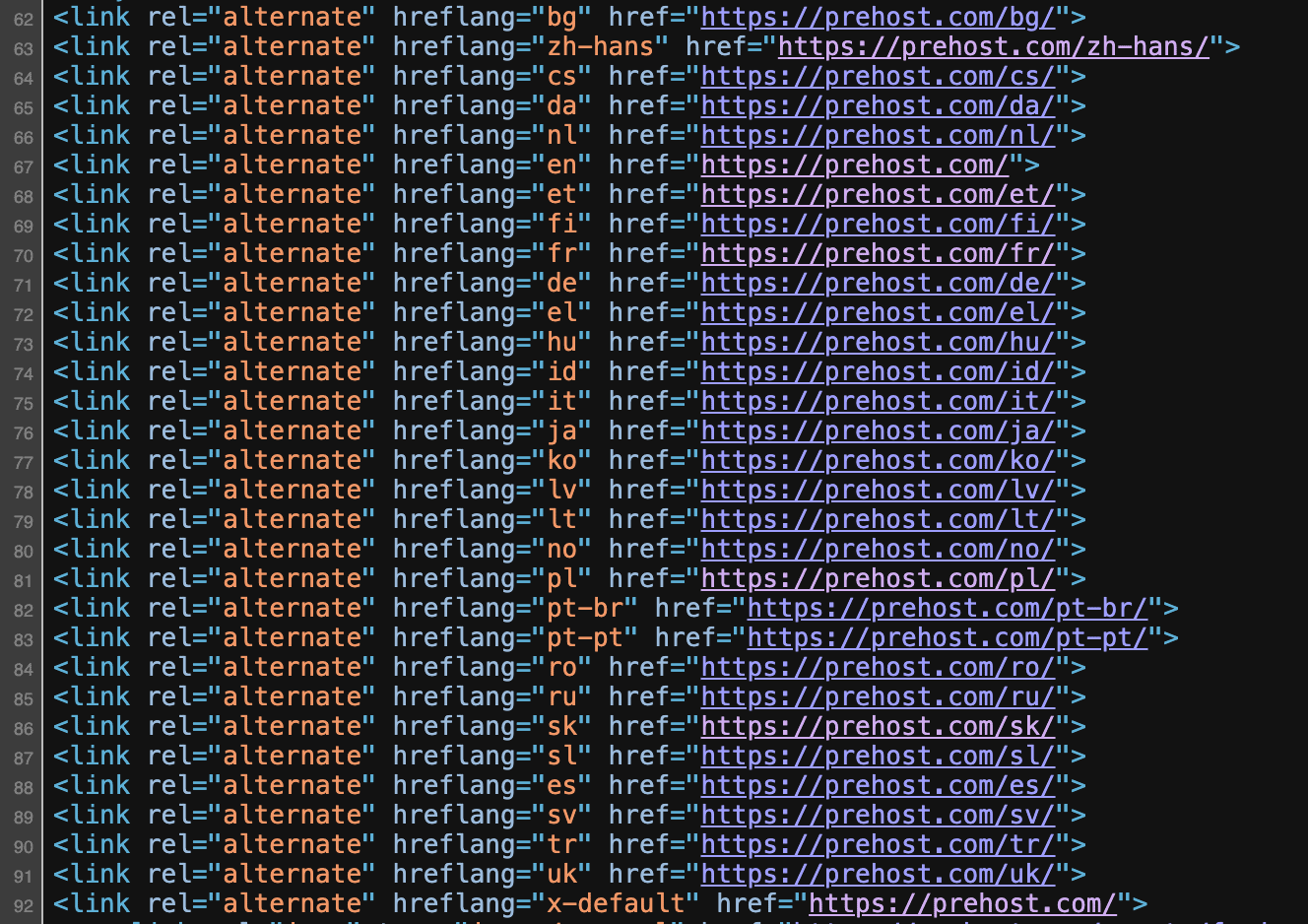
- Automatic hreflang tags for all language variants
- Support for country-specific variants: fr-FR, fr-CA, pt-BR, pt-PT
- Regional targeting for same-language different-country content
- Self-referencing hreflang for each page version
- Ability to add your own language variants, such as Canadian French or Mexican Spanish, for more precise localization
Sitemap configuration:
- Each language gets its own sitemap index (sitemap_en.xml, sitemap_fr.xml)
- Compatible with Yoast and Rank Math sitemap generators
- Proper lastmod dates per language version
- Image and video sitemaps per language
Search Console setup:
- Submit each language domain/subdirectory separately in Google Search Console
- Add all variants to Bing Webmaster Tools
- Monitor indexing status per language
- Track country-specific performance
Translating Themes, Plugins & Strings
Not all translations live in posts or pages. Interface texts from themes and plugins—buttons, form labels, widget titles—are “strings” that require separate handling through WPML’s string translation system.
Two mechanisms for plugin and theme translation:
- Theme and plugins localization: scans .po/.mo files and PHP templates
- String Translation: provides interface for editing discovered strings
Critical for complete translation:
- WooCommerce flows (cart, checkout, order emails)
- Form plugins (Contact Form 7, Gravity Forms, WPForms)
- Page builders (Elementor widgets, WPBakery elements, Gutenberg blocks)
- Theme headers, footers, and sidebar content
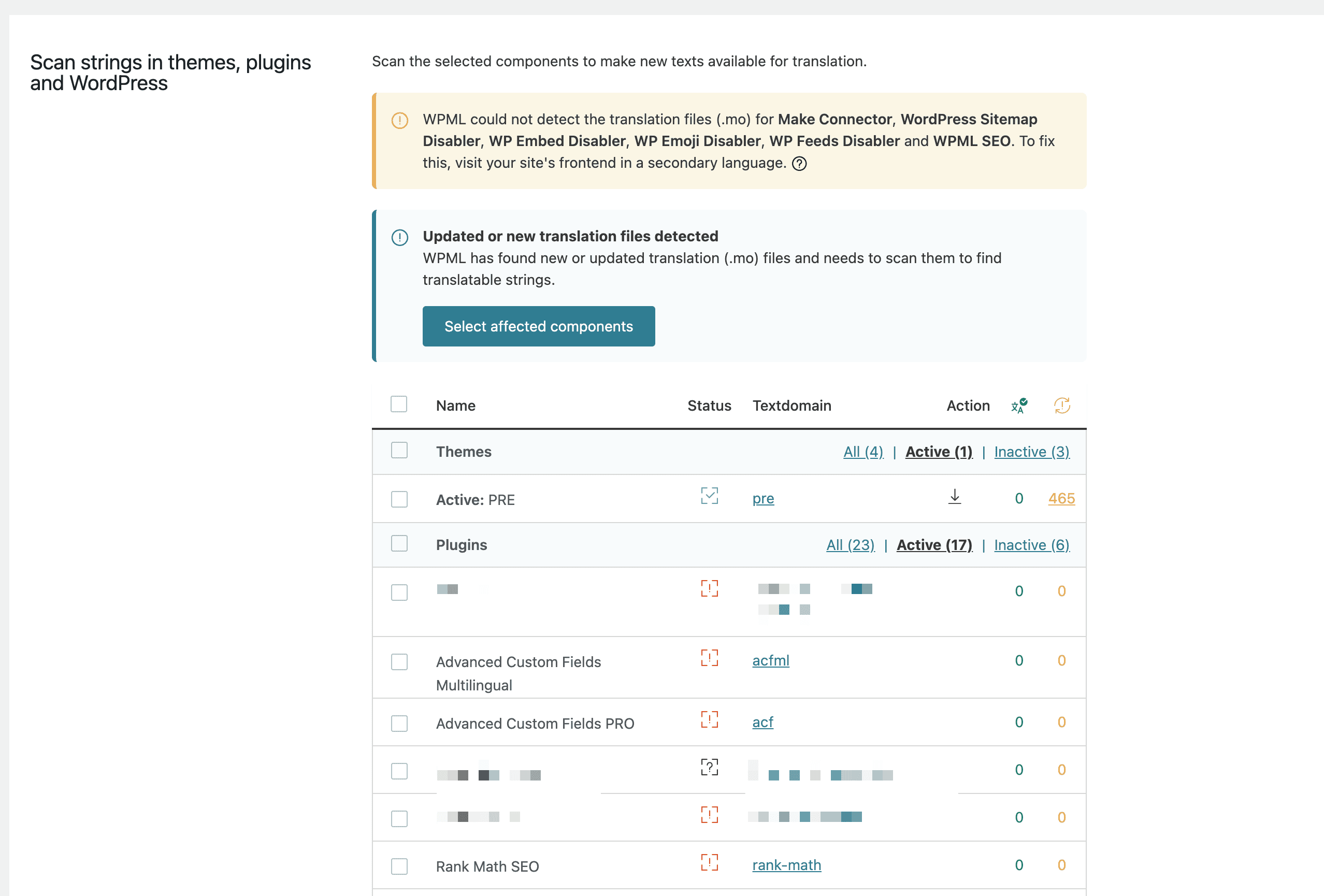
Theme & Plugin Localization Scanning
Admins initiate string discovery through WPML → Theme and plugins localization, selecting which themes and plugins to scan.
Scanning process:
- Navigate to WPML → Theme and plugins localization
- Select themes to scan (e.g., Astra, GeneratePress, Flavor theme)
- Select plugins to scan (e.g., WooCommerce, Contact Form 7, Elementor)
- Click “Scan selected themes/plugins”
- WPML parses PHP and template files for gettext strings
Concrete example:
Scanning a hotel booking plugin to translate “Check-in date,” “Check-out date,” “Number of guests,” and booking confirmation notifications into Italian and German for a vacation rental site.
Maintenance requirements:
- Rescan after major theme or plugin updates
- New strings added by updates won’t appear until rescanned
- Remove unused plugins to reduce string count
- Keep themes and plugins updated for latest translations
String Translation in Practice
Navigate to WPML → String Translation to find, filter, and translate individual strings from scanned themes and plugins.
Finding strings:
- Filter by domain (e.g., “admin_texts_woocommerce,” “astra,” “contact-form-7”)
- Search for specific words like “Add to cart” or “Submit”
- Filter by translation status (translated, not translated, needs update)
- Sort by string context or usage frequency
Translation workflow:
- Locate string in the list
- Click to expand translation fields
- Enter translation for each target language
- Mark as “Translation is complete”
- Save changes
Widget and option translations:
- Widget titles stored in wp_options appear under admin_texts_… domains
- Theme customizer settings translatable here
- Menu item labels if using custom link text
Practical example:
Translating a header “Call us now: +49 123 456” and a footer newsletter signup label “Subscribe to our updates” for German, French, and Spanish versions using String Translation interface.
System Requirements, Performance & Compatibility
WPML is a feature-rich plugin that requires a reasonably modern hosting stack. Performance and compatibility are critical considerations for stable multilingual sites.
Recommended minimum requirements:
- PHP 7.4+ (preferably PHP 8.1 or 8.2)
- MySQL 5.7+ or MariaDB 10.3+
- WordPress 6.2+
- PHP memory limit: 128-256 MB for standard sites, 512 MB for large WooCommerce catalogs
Hosting recommendations:
- Managed WordPress hosting
- VPS with PHP-FPM and OPcache enabled
- Object cache (Redis or Memcached) strongly recommended
- CDN for static assets across language versions
Theme compatibility (tested and fully compatible):
- Astra, GeneratePress, OceanWP
- Flavor, flavor theme variants
- Block-based themes (Twenty Twenty-Four, etc.)
- Most themes following WordPress API standards
Plugin compatibility:
- WooCommerce 7.x and 8.x
- Elementor and Elementor Pro
- Yoast SEO, Rank Math, All in One SEO
- Contact Form 7, Gravity Forms, WPForms
- ACF (Advanced Custom Fields)
Performance Tuning Tips
WPML adds translation tables and extra database queries. Proper optimization ensures your entire site remains fast across all language variants.
Caching configuration:
- Enable object caching (Redis preferred over Memcached for complex sites)
- Use page caching (WP Rocket, W3 Total Cache, or host-level caching)
- Configure browser caching for static assets
- Consider separate cache buckets per language
Database optimization:
- Run regular database optimization (remove post revisions, spam comments)
- Index translation tables if using custom queries
- Consider database query caching at MySQL/MariaDB level
- Monitor slow queries in development
String Translation performance:
- Disable translation domains you don’t need
- Remove unused themes and other plugins that add extra strings
- Avoid loading all strings on every page load
- Use text domain filtering for large string collections
Large WooCommerce catalog considerations:
- Sites with 50,000+ products in 3+ languages need VPS or cloud hosting
- Allocate at least 4 GB RAM for large multilingual stores
- Consider splitting product categories across multiple domains if extremely large
- Use lazy loading for translation management dashboard
WPML Pricing & Plans (2026)
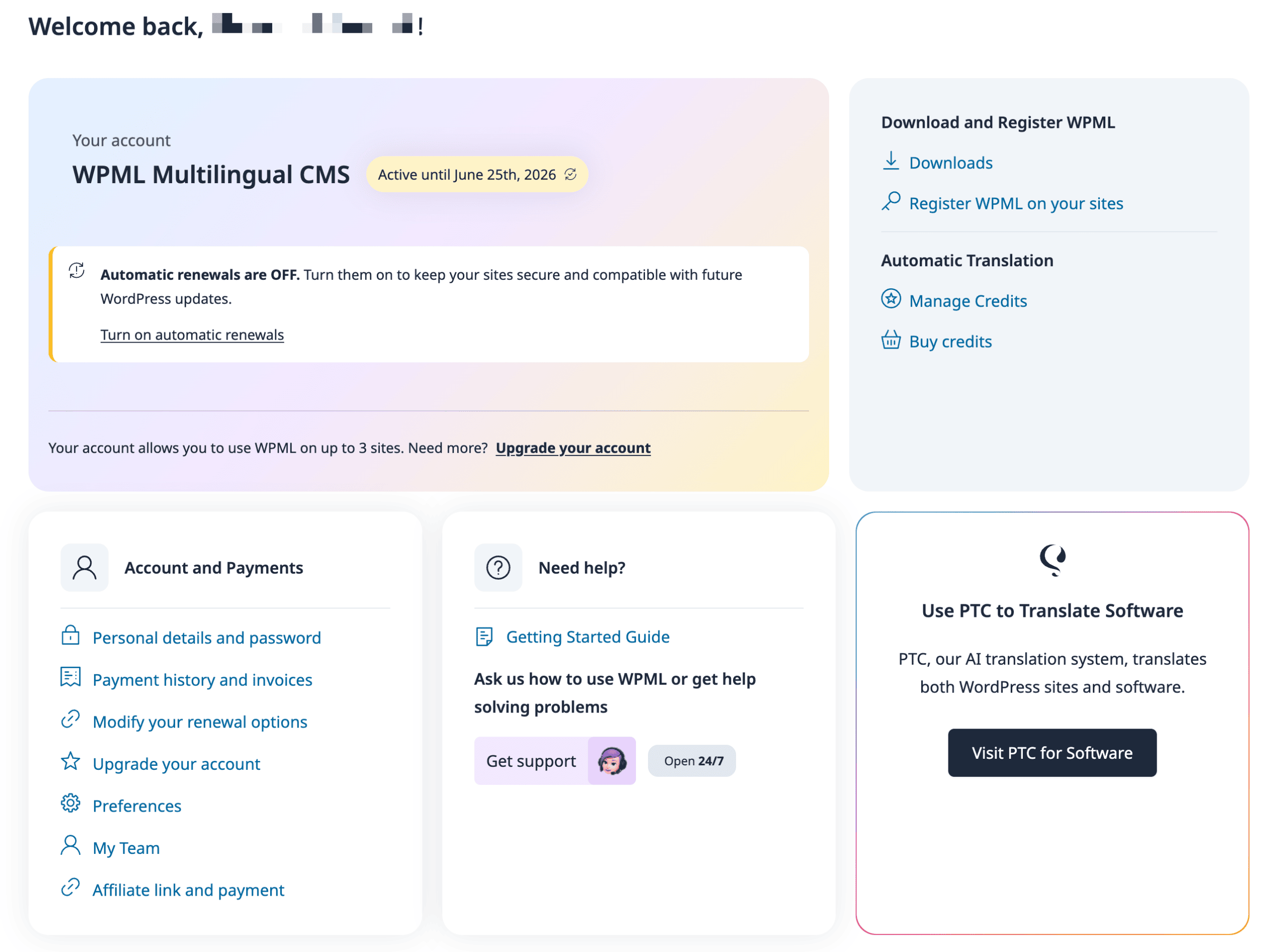
WPML is sold as annual licenses with one year of updates and support. All plans include a 30-day money-back guarantee. You can manage your account to renew your license, purchase additional translation credits, and access your user dashboard.
Multilingual Blog (€39/year):
- 1 production site license
- Supports one live site and three test sites
- Translate posts, pages, tags, categories
- No automatic translation credits included
- Basic language switcher
- Best for: simple 2-language blogs without WooCommerce
Multilingual CMS (€99/year):
- 3 production site licenses
- All Blog features plus Translation Management
- Approximately 90,000 automatic translation credits
- WooCommerce Multilingual & Multicurrency included
- String Translation for themes and plugins
- Best for: business sites and e-commerce stores
Multilingual Agency (€199/year):
- Unlimited production sites
- Supports unlimited live and test sites
- All CMS features
- Approximately 180,000 automatic translation credits
- Priority support
- Best for: agencies and developers managing client sites or many sites
- Ideal for users who need to translate content across numerous sites
Additional notes:
- Staging and development sites don’t count against production limits
- Automatic translation credits can be purchased separately if depleted
- Licenses auto-renew but can be cancelled anytime
- Translations remain if license lapses (but no updates or support)
Which Plan Should You Choose?
Choosing the right plan depends on your site complexity, number of sites, and translation volume needs.
Multilingual Blog recommendations:
- Personal blogs with 2-3 languages
- No WooCommerce or complex page builders
- Willing to translate manually or use other translation plugin methods
- Budget-conscious single-site owners
Multilingual CMS recommendations:
- Single French-English corporate site with Elementor and WooCommerce
- Small business needing product pages translated with multicurrency
- Sites requiring automatic translation for efficiency
- Most business and e-commerce sites fall into this category
- Suitable for sites that need to support multiple languages.
- WPML allows you to add an unlimited number of languages to your site with the Multilingual CMS plan.
Multilingual Agency recommendations:
- Freelancers managing 5+ multilingual client sites
- Agencies with ongoing client work
- Developers building multilingual sites for resale
- High-volume translation needs (many languages, frequent updates)
- Ideal for users managing many sites.
Upgrading between plans:
- Pay only the price difference to upgrade
- All translation history and settings preserved
- Upgrade takes effect immediately
- Downgrade possible at renewal time
Independent Test: WPML in Real Usage (Method & Findings)
This section describes an independent hands-on test of WPML on a real multilingual WooCommerce site. The goal was to evaluate translation quality, workflow complexity, and performance under realistic conditions.
Test environment:
- WordPress 6.5.x with WooCommerce 8.x
- PHP 8.1 on a mid-range VPS (4 GB RAM, 2 vCPUs)
- 3 languages: English (primary), German, Polish
- 2 currencies: EUR (primary), PLN
- Theme: flavor theme (block-based with Astra elements)
- Plugins: WPML plugin, Yoast SEO, Contact Form 7, WooCommerce
Test scope:
- 100 product pages with descriptions and variations
- 30 blog posts (mix of short and long-form)
- Theme strings (header, footer, navigation)
- WooCommerce checkout flow and emails
- Contact form labels and confirmation messages
Evaluation criteria:
- Translation quality and accuracy
- Workflow complexity and learning curve
- Performance impact on page load
- Compatibility with SEO plugin and form plugin
Users have reported mixed experiences with WPML’s support and functionality.
Test Results: Pros Observed
Based on our testing, WPML delivered strong results across most evaluation criteria.
Translation speed and quality:
- Automatic translation processed 100 product descriptions and 30 blog posts into German and Polish in under one hour
- Machine translation quality was acceptable for product descriptions after minor edits (brand names, technical terms)
- Blog posts required slightly more editing for natural flow in German
- Polish translations from DeepL were notably accurate
WooCommerce integration:
- Product categories, attributes, and variations translated correctly
- Checkout texts (tax labels, shipping methods) appeared in all three languages
- Order confirmation emails sent in customer’s selected language
- Currency switching worked seamlessly between EUR and PLN
SEO integration:
- Yoast SEO allowed separate meta titles and descriptions per language
- Localized URLs created cleanly (/de/kategorie/ for German categories)
- Hreflang tags generated automatically and validated in testing tools
- Sitemaps generated per language with correct URLs
String Translation effectiveness:
- Theme header and footer texts localized without editing PHP files
- Contact Form 7 labels and messages translated via String Translation
- WooCommerce button text (“Add to cart” → “In den Warenkorb”) working correctly
Performance under caching:
- Cached page load times: 1.2-1.5 seconds on tested VPS
- Admin dashboard responsive with object caching enabled
- No noticeable slowdown compared to single-language baseline
Test Results: Limitations & Cons
Our testing also revealed areas where WPML requires careful planning or presents challenges.
Initial setup complexity:
- Configuration took several hours for a complete multilingual setup
- Language URL structure, menu translation, and widget duplication required attention
- WooCommerce multicurrency setup added additional configuration steps
- More complex than single-language sites or simpler multilingual plugin alternatives
Performance without optimization:
- Admin pages (especially String Translation) noticeably slower without object caching
- Shared hosting would likely struggle with large string translation tables
- Translation Management dashboard loads slower with many pending jobs
- Database size increased approximately 2.5x with 3 languages
Plugin string discovery:
- Some Contact Form 7 notification strings required manual rescanning after form updates
- A few theme customizer strings needed manual registration before appearing
- Third-party plugin strings occasionally required support forum consultation
Learning curve:
- Number of options (translation modes, url format settings, workflow rules) overwhelming for first-time users
- Documentation helpful but extensive—requires time investment
- Non-technical users may need training or developer assistance
- Differentiating between post translation and string translation concepts takes adjustment
Important note: Ultimately, after the test, we decided to use WPML on Prehost.com.
WPML vs. Other WordPress Translation Plugins
WPML competes with several alternatives including Polylang, TranslatePress, and Weglot. Each plugin takes a different approach to creating multilingual websites.
WPML’s distinctive approach:
- Deep integration with WordPress database structures
- Robust WooCommerce multicurrency support
- Flexible workflows for agencies with multiple translators
- All data stored on your WordPress site (no external dependencies)
When competitors might be simpler:
- Polylang: Free basic version for simple blogs, similar database approach
- TranslatePress: Visual front-end editing, easier learning curve
- Weglot: SaaS-based automatic translation, minimal setup
WPML’s advantages for complex projects:
- Professional translator workflows with approval processes
- Granular control over what gets translated automatically vs. manually
- Multicurrency with manual pricing per product
- Long development history (10+ years) with broad compatibility
When WPML Is the Better Choice
WPML typically outperforms alternatives in specific scenarios requiring depth and control.
Large WooCommerce operations:
- EU fashion retailer with localized product slugs in 4 languages
- Size guides and product specifications requiring precise translation
- Synchronized inventory across language versions
- Different pricing strategies per market (manual multicurrency)
Agency and enterprise requirements:
- Efficiently manage multiple languages across complex sites
- Multiple translator accounts with language-specific assignments
- Approval workflows before content goes live
- Translation memory and glossary management
- Client sites where data must remain on WordPress servers (GDPR compliance)
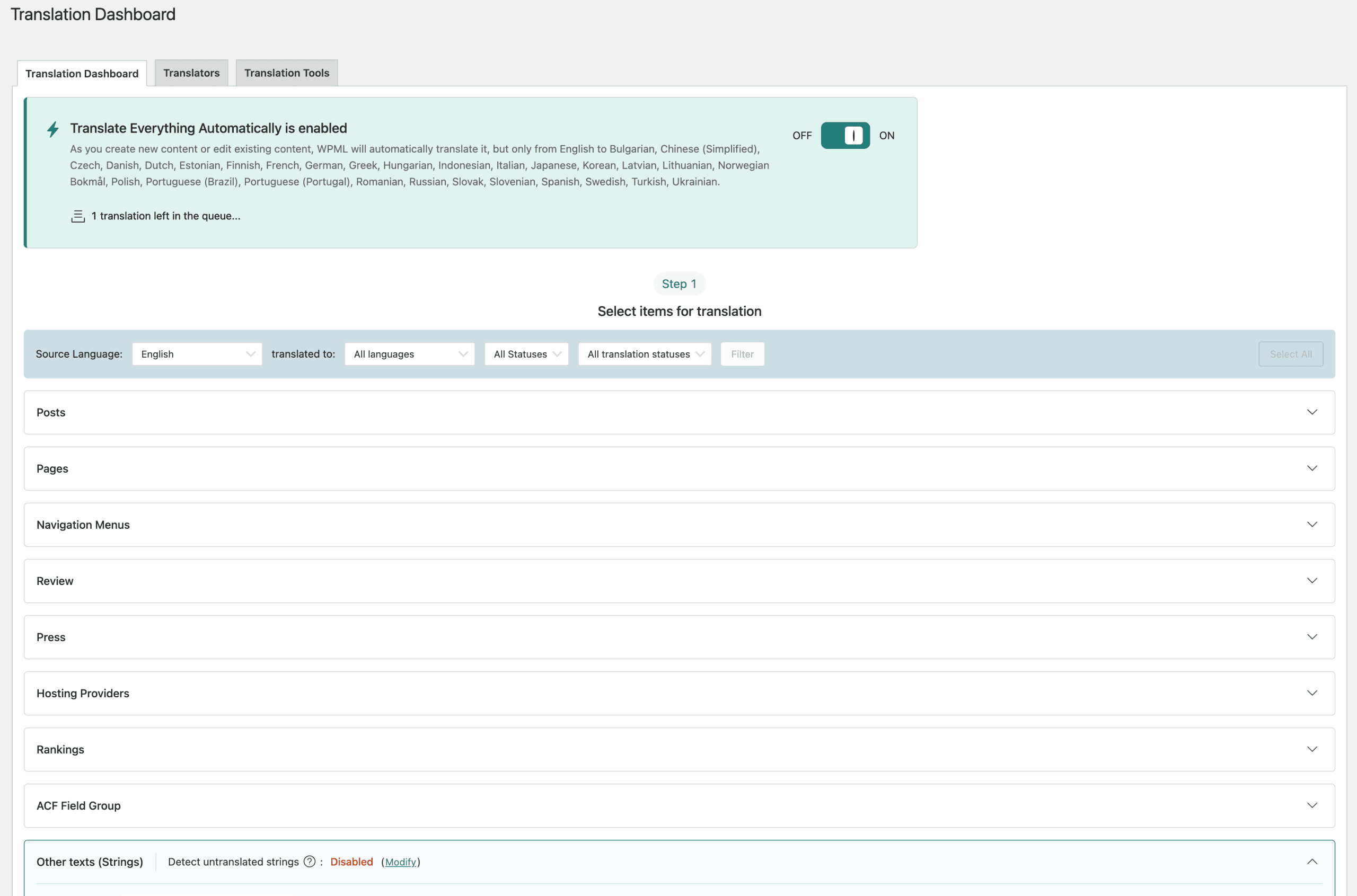
- The Translation Dashboard provides a centralized hub where users can filter, select, and manage all translatable content in bulk.
Long-term corporate projects:
- Sites expected to operate for many years
- Need for compatibility with evolving WordPress core
- Regular theme and plugin updates requiring stable translation system
- Established support infrastructure and documentation
Concrete example:
An EU fashion retailer selling in Germany, France, Italy, and Poland needs localized product pages, size conversion charts per country, pricing in EUR and PLN, and SEO-optimized category URLs. WPML’s combination of WooCommerce Multilingual, multicurrency, and localized slug support makes sense for this complexity level.
FAQ About WPML (Concise, Practical)
Is WPML free? No. WPML is a premium plugin with annual licenses starting at €39/year. Unlike Polylang, there is no free version available.
How do I activate WPML after installation? After installing the WPML plugin, go to the Plugins page in your WordPress dashboard and click “Activate” under WPML. Once you activate WPML, the setup wizard will guide you through the initial configuration to enable multilingual features on your site.
Can I disable a language temporarily? Yes. Navigate to WPML → Languages and uncheck the language. Content remains in the database but won’t display on the front end until re-enabled.
Does WPML support RTL languages like Arabic and Hebrew? Yes. WPML fully supports RTL (right-to-left) languages and automatically switches text direction based on the active language.
Can I migrate translations if I change themes? Post and page translations are stored independently from themes and will transfer. String translations for theme-specific texts will need to be recreated for the new theme.
Can WPML handle different domains per language? Yes. WPML offers a language-per-domain option where example.com serves English, example.de serves German, and example.fr serves French—each with full SEO independence.
What happens if I uninstall WPML? Translated content remains in the database, but links between translations and language metadata are removed. Re-activating WPML won’t automatically restore these connections. Plan carefully before uninstalling.
Do I need to pay for automatic translation credits separately? Higher-tier plans (CMS and Agency) include bundled credits. If depleted, additional credits can be purchased. The Blog plan includes no automatic translation credits.
Can I use WPML with other plugins like Elementor or Gutenberg? Yes. WPML is fully compatible with major page builders including Elementor, Bricks (since version 1.9.1), and the WordPress block editor. Using wpml works seamlessly with most popular plugins.
Conclusion: Our Opinion on WPML After Testing
After extensive hands-on testing, WPML proves itself as a powerful, mature solution for serious multilingual and multicurrency WordPress projects. The learning curve is real, and performance optimization matters, but the depth of features justifies the investment for complex sites.
Key takeaways from our review:
- For small two-language blogs without WooCommerce, WPML may be more than needed—simpler alternatives exist
- For WooCommerce stores with multicurrency needs, agency workflows, or professional translation requirements, WPML’s depth is unmatched
- Performance requires attention: object caching, proper hosting, and database optimization are non-negotiable for larger sites
- The translation management system accommodates everything from solo bloggers to enterprise teams with multiple translators
Recommendations before purchasing:
- Verify your hosting meets requirements (PHP 8.1+, adequate memory, caching capability)
- Define your translation workflow in advance: who translates what, automatic vs. manual, approval processes
- Start with 2-3 core languages before scaling to more languages
- Test thoroughly on a staging site and use the 30-day refund window to confirm compatibility with your themes and plugins
Bottom line:
If you’re building a global audience presence on WordPress, WPML remains the most comprehensive option for creating multilingual and multicurrency websites that you fully control. Take time to configure it properly, invest in decent hosting, and the plugin will serve complex internationalization needs reliably.